Cutting Diagrams 101
A cutting diagram is a graphical representation of a board or sheet, containing all the necessary information to execute the cutting operations.
Modern software automatically creates cutting diagrams. Typically, this occurs immediately after the optimization, which is a complex combinatorial problem that can be solved relatively quickly by computers.
With a cutting diagram in hand, the machine operator can input the cutting sequence into the cutting equipment or even use the diagram as a guideline to operate traditional (non-CNC) cutters.
Following the cutting diagram reduces the fabrication time, eliminates errors, and gives predictability of the effort required to produce all parts.
Cutting Diagram Anatomy
The following image represents a cutting diagram of a sheet that will be cut using a guillotine, band saws, or even manually.
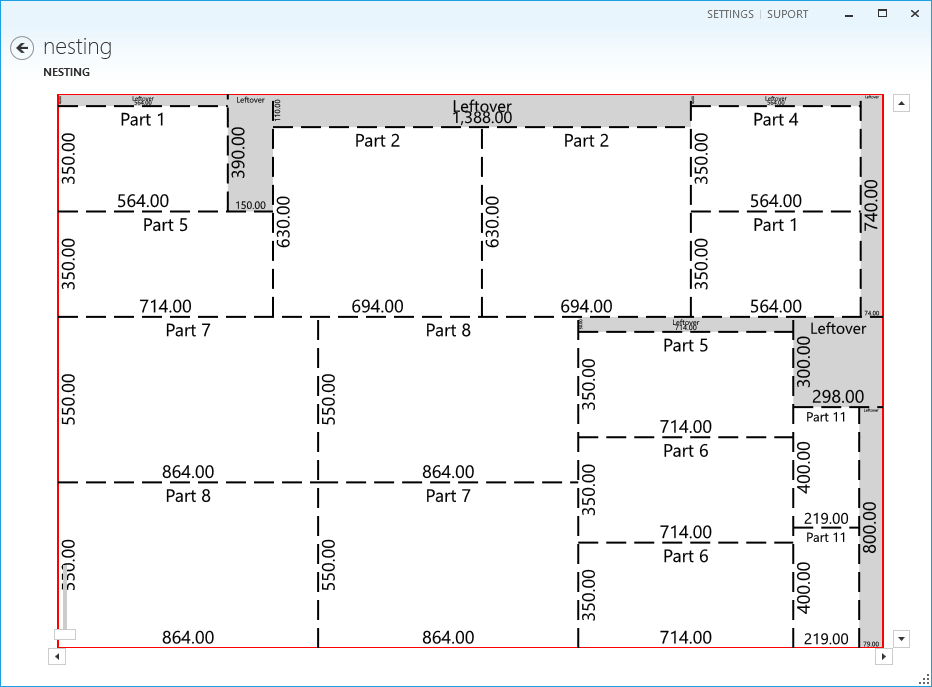
We can highlight some important information from the above cutting diagram:
1 - The red rectangle represents the sheet borders. They must be configured accordingly to the board size you have.
2 - The dashed lines represent the cutting operations that must be performed. Note that each cut goes from one edge to the other of the part being cut. Cuttings are not supposed to be partially made.
Obviously, every cut results in the creation of two other pieces. Each one can be the final piece, a leftover, or a piece that will have to be cut again.
It is essential to specify the kerf (or blade width) so the layout optimization can consider this material waste while finding the best layout for the parts.
3 - The part dimensions (width and length) can be used to orient the position of the cuttings in relation to the previous cut or the board.
At this stage, the use of adhesive labels is recommended for identification and traceability. The sooner you identify the parts, the better. When parts have similar dimensions, it may be difficult to distinguish them further during the assembly process.
4 - The grayed areas represent waste or leftover parts. Depending on the size of the parts you produce, you may be able to reuse some of these parts. However, it is recommended that you consider whether it's worth reusing leftovers or waiting a little to incorporate more parts into the original plan.
The more different and the quantity of parts directly affect the optimization level.
CNC machines
For cutting diagrams created for CNC machines like laser, plasma, water jet, routers, and other CNCs, the cutting diagram must be present in a digital format that can be interpreted by Computer Aided Manufacturing (CAM) programs.
CAM programs will interpret the cutting lines and transform them into tool path commands for a specific equipment.
DXF files or even g-code are the standard formats to be used to send data to industrial cutters.
Other relevant information
Depending on the company's workflow, additional information may be necessary, such as edge banding indications, first cut indications, and board margins.
Next steps
Not started yet with Otimize Nesting? Create your account now and start nesting in 5 minutes.